
Lately I have been working a lot with GitHub Actions, which includes creating some reusable workflows.
Since these are intended to be used by other people, I think User Experience (or maybe its more correct to call this Developer Experience?) is super important both for adoption and for being able to gather feedback and iterate quickly on what we deliver.
This posts gives you a quick look at how you can setup a visually nice and informative GitHub workflow summary.
You dont need to know too much about Terraform or IaC to read this, but keep in mind I use it as an example for something to display info about.
The example workflow
The example workflow used here is a simple Terraform workflow, and in essence will accomplish a few things:
- Run Terraform Plan
- Store The Plan and lockfile as Artifacts
- Wait for Approval before Apply
So already, lets clarify that the intent here is that a reviewer should review the suggested plan, and approve this before the workflow proceeds to Apply.
For this to happen, its important that reviewers can understand and digest the information easily.
GITHUB_STEP_SUMMARY
The GITHUB_STEP_SUMMARY environment variable was introduced in 2022, and allows us to basically input any valid Markdown code, and displays this on the summary of a run Workflow.
Take this example Workflow code:
name: Run Example Workflow 🏃
run-name: ${{ github.actor }} has triggered Running a Workflow 🏃

on:
  workflow_dispatch:

jobs:
  example-summary:
    runs-on: ubuntu-latest
    steps:
      - name: Output Some Markdown Code in Summary 👀
        run: |
          {
            echo '# Yay, you ran this workflow! 🎉'
            echo ''
            echo '## Workflow Details'
            echo '- Branch: ${{ github.ref }}'
            echo '- Commit: ${{ github.sha }}'
            echo '- Actor: ${{ github.actor }}'
            echo ''
            echo '```'
          } >> $GITHUB_STEP_SUMMARY
You can see here that we append the output of those echo commands to the file located at the path defined in the $GITHUB_STEP_SUMMARY environment variable, and that we at the same time expand the value of some other built-in GitHub variables, a list of which you can find here.
In essence, the $GITHUB_STEP_SUMMARY environment variable is just the path to a file, and you can use any method you wish to construct the contents of this file.
Example Step Summary
Having run the above example, we will get something like this:
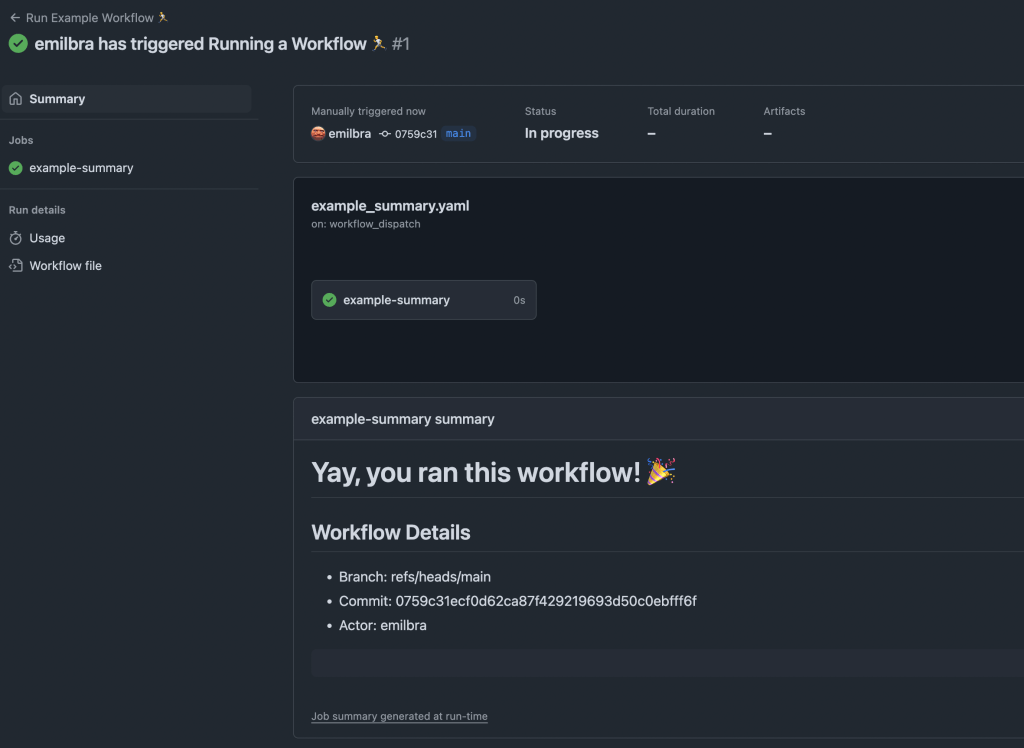
As this is fully featured (GitHub flavored) markdown, you can really output anything you wish for, including diagrams, pictures, tables, etc.
Step Summary for Terraform Plan.
The following code block shows an example for first generating a plan-file and then outputting this in a nice format. For brevity, we are skipping other Steps related to Terraform here.
      - name: Terraform Plan for ${{ inputs.terraform_environment }} ✍️
        run: |
          terraform plan -input=false -var-file="env/${{ inputs.terraform_environment }}/masterdata.tfvars" -parallelism=100 -lock=false -out=tfplan
        id: terraform_plan

      - name: Output Terraform Plan in Summary 👀
        run: |
          {
            echo '# Successfully ran Terraform Plan for ${{ inputs.terraform_environment }} :rocket:'
            echo ''
            echo '## Workflow Details'
            echo '- Branch: ${{ github.ref }}'
            echo '- Commit: ${{ github.sha }}'
            echo '- Actor: ${{ github.actor }}'
            echo ''
            echo '## Terraform Plan'
            echo '```hcl'
            terraform show -no-color tfplan
            echo '```'
          } >> $GITHUB_STEP_SUMMARY
        id: terraform_plan_summary
Notice how we use the native “terraform show” command to display the contents of the generated plan.
If we combine this with having the Terraform Apply job gated by a Github Environment (read more about that here, but out of scope for this post), we have a nice summary that an authorized reviewer can review without reading the job outputs or code directly.
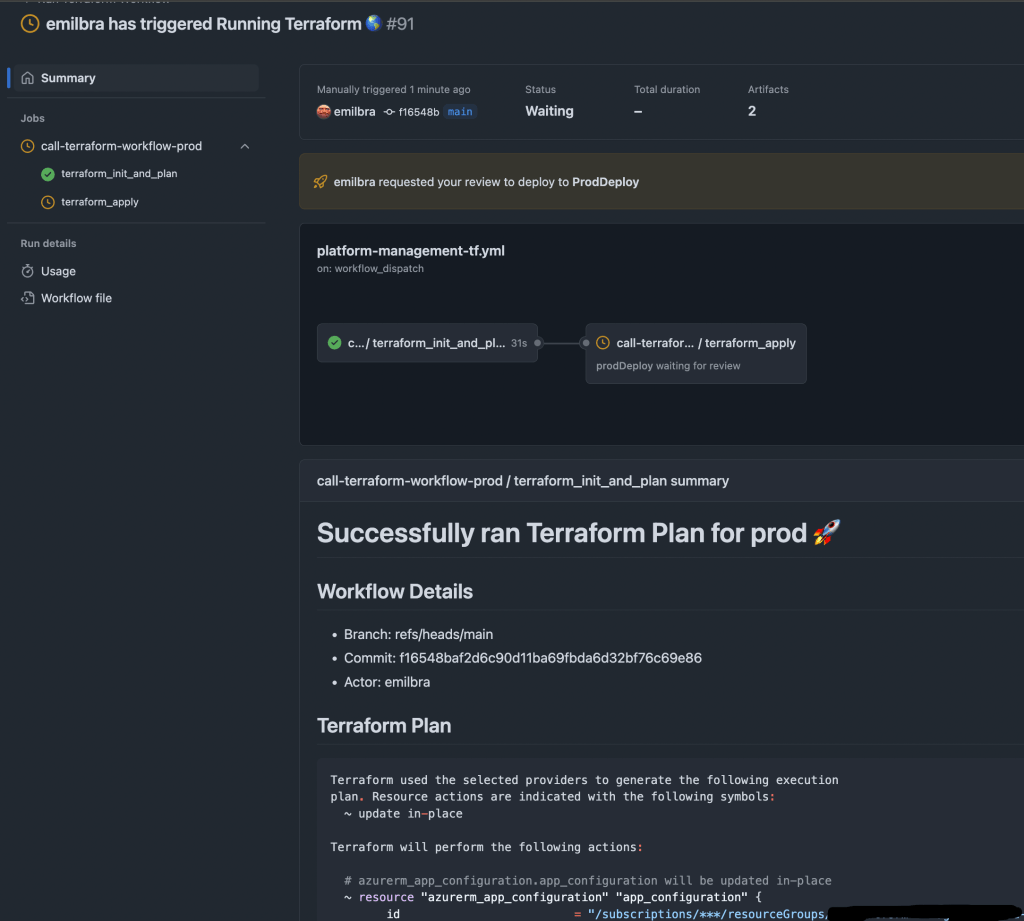
The whole Terraform Plan here is not shown on this screenshot, but it is formatted nicely, making it easy to read.
Be liberal with emojis and colors
Honestly, I just put emojis and colors anywhere. The simple reason is that its fun, but also that I think it helps our eyes to locate information much faster 👀.
Recognizing an emoji is far simpler and more engaging than recognizing a string in a flood of text.
What next?
While writing this post, I came across Terramaid, which is a tool that generated Mermaid Diagrams based on Terraform plans.
I am considering implementing this in one of my workflows, as it seems great for communicating relations between resources created by Terraform.
My team and i also recently had to tackle the challenge of calling terraform modules in internal repositories, which is not as easy as you might think due to how terraform uses Git behind the scenes to pull these modules.
Feel free to comment if you’d like me to cover any of this next! 👋
 Emil Brasø
Leave a comment