
Do end-to-end tests on your Terraform code with Terragrunt
In my previous post we looked into using git pre-commit hooks for static code analysis of Terraform code. If you have not already, i suggest you read the post, combining quick and effective static code analysis (run as early as possible) with E2E tests gives us timely and holistic test results.
The other post also gives an introduction to some basic concepts we need to understand regarding testing Terraform code. If you dont need that, feel free to jump right into this one.
So, why do this again?
While terraform and static code analysis tool catches many errors, using Terratest to test our code makes us able to catch a wider range of issues. This include provider errors, such as with an API, qouta limits or values not accepted.
The biggest benefit is of course that we can actually test that creation of the infrastructure in question works as expected, in other words that we can test real world scenarios, and that the code really provides the expected values.
Prerequisites
For E2E we are going to use Terratest by gruntwork.io. There is not a separate installation step for installing Terratest itself, but we need to import it into a GO program we are about to create.
So we need to install the programming language GO, follow the install instructions applicable to your setup: https://go.dev/doc/install
Some knowledge with GO is recommended, but I believe its easy to get started with just some basic programming knowledge, as we will review soon 👇
Additionally, since we are using Azure in these example, we need a way to authenticate to Azure. I suggest using az-cli, and running the az login command to authenticate to an Azure Account.
What is Terratest?
Terratest is a GO library for doing automated tests of our Infrastructure as Code. This includes not only Terraform, but also Docker Images, Packer templates, Cloud Provider APIs and much more.
We are only going to look at testing Terraform here.
In practice this means that Terratest provides a lot of pre-made code that we can use for writing tests with go.
Let us start
Start by cloning this git repo:
https://github.com/emilbra/sunshine_and_unicorns/tree/main
This repo contains some terraform files for creating an Azure Resource Group and an Azure Key Vault inside that resource group.
A few variables are defined
- rg_name
- rg_location
- my_kv_name
- my_tenant_id
When creating our terratest code, we will pass values to these variables.
Additionally, a few outputs are defined:
- keyvault_uri – this is a URI that is automatically created by Azure
- keyvault_name – this is the keyvault name that ends up being used.
- keyvault_location – this is the keyvault location that ends up being used.
- rg_name – the name of the rg that ends up being used.
Keep in mind that these outputs are referencing attributes exported by the resources created by our code, and not the variables we are inputing. This matters, since this gives a representation of what value were actually used by Azure.
For example, the output for keyvault_uri (a automaticallly created value) looks like this:
output "keyvault_uri" {
  value = azurerm_key_vault.my_kv.vault_uri
}
To get some insight into what attributes a resource outputs, review the “Attributes reference” heading for the relevant resource’s documentation in Terraform Registry:
So, as a reminder, our code will be creating a simple azure key vault, using this resource-block:
resource "azurerm_key_vault" "my_kv" { #tfsec:ignore:azure-keyvault-no-purge
  name                = var.my_kv_name
  location            = azurerm_resource_group.my_rg.location
  resource_group_name = azurerm_resource_group.my_rg.name
  sku_name            = "standard"
  tenant_id           = var.my_tenant_id
  network_acls {
    bypass         = "AzureServices"
    default_action = "Deny"
  }
}
The attributes name and tenant id are inputs, and we will test these values as well as the keyvault_uri as mentioned earlier.
The GO code
The go code for testing terraform is available here:
https://github.com/emilbra/sunshine_and_unicorns/blob/main/terratest/my_test.go
I have written quite a few comments in the code, so its probably easiest to give that a read.
To execute the test, we will do these few steps:
- Authenticate to Azure (or your provider of choice)

- Step into the terratest folder, and execute
go testthis will automatically run tests based on files with _test in its name (my_test.go)

I’ll save you from reading all of the logs, but you can note that terratest is running many common terraform commands in the background, such as terraform init and terraform apply with -var flags dependent on values we set in the go code.
On a high level, our test will:
- Apply the terraform code as invoked by this function:
terraform.InitAndApply(t, terraformOptions) - Save outputs as values, for comparisons later, like this:
actual_kv_uri := terraform.Output(t, terraformOptions, "keyvault_uri" ) - Assert that the values are as we expect them to be:
assert.NotEmpty(t, actual_kv_uri) in the case of kv_uri, we need to check that it indeed does exist. - Lastly, the defer we set earlier runs after everything else in the function has evaluated, making sure that terraform destroy is run, no matter the outcome of the surrounding function.
defer terraform.Destroy(t, terraformOptions)
Run the test
So, to run the test, simply use the command go test in the directory named “terratest”. This will automatically find the file with _test.go in its name, and execute the code we have written.
After running, a test result will be produced. For a successfull run, it may look like this:

For an unsuccessful test (lets say that the name for the key vault is already in use ), it can look like this:
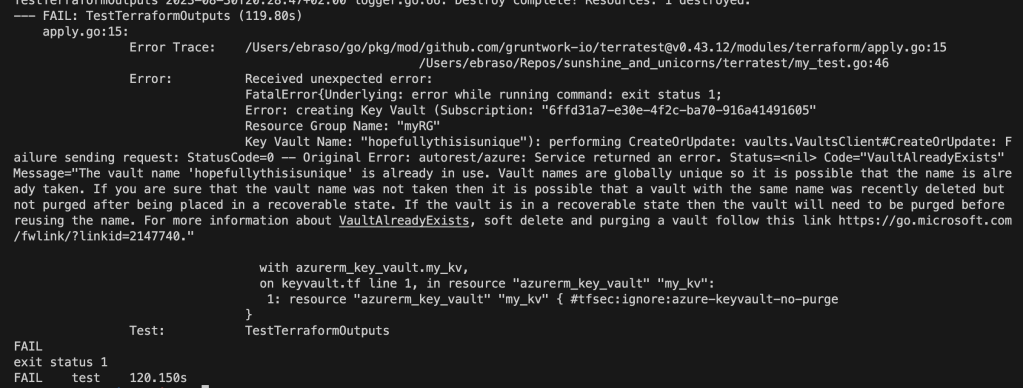
Terraform validate and plan run on the same code would throw no error, since this is an error outside of what is visible for Terraform.
That error itself is kind of contrived – but it is an easy way to illustrate the kind of error you will not discover until terraform apply actually has been run.
Whats next?
Thanks for reading! I hope this gave you some insight into how you can use Terratest. Here are some links with additional examples and a quickstart.
https://terratest.gruntwork.io/examples/
https://terratest.gruntwork.io/docs/getting-started/quick-start/
 Emil Brasø
Leave a comment