

Efficiently test your Terraform code with pre-commit hooks!
This is the first of a two-part article. This post gives an introduction to testing in Terraform, some concepts we need to know about, and how to implement this using pre-commit hooks.
The second part, which you can read here, provides an introduction on how to perform end-to-end tests with Terratest. If you’re only interested in that, feel free to jump there.
Also, while writing, this post quickly became lengthy, as I believe it is always helpful to cover some basics and concepts before practice, making sure we are all on the same page.
The practical part starts here.

Introduction
Imagine that this is you:
You and your team have written Terraform code for all your infrastructure, maybe you even used an import tool, such as Azure Terrafy.
You have deployed your infrastructure through infrastructure as code, and it applies cleanly – everything is sunshine 🌞 and unicorns 🦄. Your Virtual Machines, your virtual networks, and everything else you may have are in a working state.
Now, you need to implement some changes, or you want to introduce a new piece of infrastructure to your environment.
Everything breaks! 💔
Well, maybe not everything. Maybe Terraform Apply fails, even though Terraform Plan went through fine. Or maybe a critical component disappears.
This is an error you have not seen before. Maybe a change you made to simplify your code made unexpected things happen, or perhaps the API for the cloud provider you are using returned an error.
In a worst-case scenario, your service is now facing downtime due to an error not caught by the built-in controls in Terraform.
In any case, things are not right, and now you need to spend some time figuring out what’s wrong and how to resolve this.
In these posts, I’m not saving you from all potential debugging. However, with proper testing and linting mechanisms, you can avoid a lot of issues before even deploying.
The Why (Now)
Infrastructure as Code (IaC) has been named as a key pillar in DevOps and platform engineering practices for quite some time now, so it comes as no surprise that many organizations have spent considerable time and effort into implementing IaC.
Unfortunately, some teams are missing a holistic view, which includes making use of one of the most important features of IaC – developing and testing as you would with any “conventional” code.
And it is completely understandable. For example, the Terraform Associate certification doesn’t go into testing of code at all, outside of Terraform validate and plan.
So, one would be forgiven for not implementing more complete testing strategies for IaC.
This may be especially true for teams that are involved in operations. These are contexts where the team’s output was not always “as Code,” and therefore no real strategy for testing code had been implemented. However, I believe testing is very valuable even for these teams!
The point of proper testing is to catch errors before they are deployed. Believe me, errors can and will occur, no matter how many times you have checked. By using proper tooling and testing, you not only reduce errors, but you also help ensure good code and documentation quality, making future work easier.
So, with this post, I hope to inform you of some easy steps that can quickly help you improve your development of Terraform code and make deployments more reliable.
Who should test their terraform code?
Not every team has any use of the tools we cover, but after having reached a stable state you should control and make your deployments as safe as they can be in the future. If this is neglected you may risk impacting your uptime.
The level of involvement needed for different kinds of testing also matters. For example Terratest will usually deploy infrastructure to test for while the test is running, as we often use it to test outputs.
In contexts where such “real” tests are not an option, E2E testing tools such as Terratest is maybe not the best fit. I probably wouldn’t recommend Terratest for a single poweruser just running terraform in their personal lab. Terratest also required knowledge of the GO programming language, so there is that.
Pre-commit hooks, which is the primary topic for this post, are much more lightweight and easier to get started with than Terratest, so this is usually where I suggest teams getting started with testing should begin.
What we will review
Lets look into how you can test your Terraform code long before deployment using a selection of pre-commit hooks for basic and immediate testing.
Concepts
First, let’s get a common understanding of the concepts we are talking about.
End to end testing
To start of, end to end testing means to test the whole journey, usually by testing outputs of the components/system/code. This is done in a way that simulates real world usage. This is pretty different from static code analysis, in the way that end to end testing tests what the actual output and flow of some code were, and not based on what our code looks like, this is as opposed to static code analysis.
This means we get a more complete view of the lifecycle of the resources we are testing. An example is the pitfalls Terraform sometimes encounter when interfacing with the APIs provided by cloud providers such as Azure.
This may for example be the globally unique name requirement for Azure Key Vaults, which Terraform itself has no way to verifying. Terraform validate and static code analysis would return clean in such event!
We commonly abbreviate End to end testing as E2E testing.
In this post we are looking into using Terratest by terragrunt for E2E tests of Terraform, for now, lets look into pre-commit hooks.
Static Code Analysis
We already touched upon that E2E testing and Static code analysis is two different things. You should be aware that these two testing methods are not mutually exclusive or that one is better than the other. In fact, static code analysis is often much quicker and easier to do than E2E, since you don’t need to set up infrastructure or wait for some output. These two methods complement each other neicely.
Static code analysis works by scanning the code for patterns and potential vulnerabilities without actually executing or simulating the code. If everything looks clean, such as the syntax being valid or the code follows predefined rules, we can proceed.
Static code analysis is often times very quick to execute since it dont actually execute (or simulate) any of the code. E2E tests on the other hand, will often execute all of our code.
Tools for static code analysis of terraform include Terrascan, Checkov, Tfsec and even manually reviewing your code. There are quite a few options, your team should ultimately consider the differences when selecting.
For the remainder this post we are focusing on using Tfsec trough a pre-commit hook for automatic static code analysis.
What is pre-commit hooks
Git hooks are a feature of Git that allows us to run scripts when certain actions happen. Such events would for example be on commits or on a push. There are a lot of options here, and we will make it so Tfsec runs before a commit occurs, hence “pre-commit hooks”
Git hooks are a very powerful feature, and I do suggest you give it a look if you are using Git at all.
To make use of pre-commit hooks easily, we are also using the pre-commit framework. It is a multi-language package manager for pre-commit hooks meant to make it seamless to install pre-commit hooks.
So why E2E and static code analysis together?
Combining E2E and static code analysis helps us get a holistic view. Static Code analysis is very quick and effective, and most errors tied to the code and quality of code would be caught here. Still, it wont catch all errors.
To help us get better coverage, we may combine it with E2E testing. E2E, as mentioned, measures the actual outputs and flow of the code, so we know with greater certainty that the code is working as intended.
A good practice is to “Shift Left” our testing as much as possible. Meaning we test as early and as often in development as possible. Many issues will be caught by the effective static code analysis, invoked by git commits, long before the more involved E2E tests.
By testing this early, errors are also much easier to resolve. The knowledge is still fresh and you probably dont risk impacting more than you intend.
You will do static code analysis on every commit, which pre-commit hooks enable us to do. The E2E tests could be reserved to on demand or on a pull request.
As a reminder, we will only look into using pre-commit hooks for static code analysis in this post, and then move on to using terratest for End-to-End testing in this post.
Okay, enough words, let’s get practical!
First, we will review how we can use pre commit hooks. As mentioned, these hooks run before a commit, making sure the content that we commit are up to standard.
This is a great first line of defence as it can very quickly in development catch errors, such as faulty syntax or subpar security practices.
Install pre-commit hooks
I am using a Macbook, but the general steps should be the same regardless of platform.
First, install the pre-commit package manager to easily manage and use pre commit.
brew install pre-commit
Then you would either create a file called .pre-commit-config.yaml or you would generate a sample configuration using the command
pre-commit sample-config
The generated sample .pre-commit-config.yaml would look like this:
repos:
-   repo: https://github.com/pre-commit/pre-commit-hooks
    rev: v2.3.0
    hooks:
    -   id: check-yaml
    -   id: end-of-file-fixer
    -   id: trailing-whitespace
-   repo: https://github.com/psf/black
    rev: 22.10.0
    hooks:
    -   id: black
In any case, you will declare what pre-commit hooks to use in this file!
Now, the pre-commit hook “black” is not useful for terraform, but how do we know what hooks are available and useful for us?
The pre-commit project maintains a list of hooks here, https://pre-commit.com/hooks.html, its a great reference tool. We can filter by type or ID, so make sure to take a look.
For Terraform specifically, Anton Babenko have created a great collection of useful pre-commit hooks, as detailed here: https://github.com/antonbabenko/pre-commit-terraform
The hooks included there are:
- Linters such as tflint
- Static code analysis tools such as Checkov, terrascan and tfsec
- formating commands such as terraform fmt
- And more!
For the purpose of this post, let us pick these specific hooks:
| NAME/LINK | PURPOSE |
| Tfsec | Tfsec is a tool for static code analysis |
| terraform_fmt | Runs terraform format, ensuring code is formatted |
| tflint | Linter for terraform, ensure good quality and correct syntax and discover basic errors |
Our .pre-commit-config.yaml now looks like this:
repos:
- repo: https://github.com/antonbabenko/pre-commit-terraform
  rev: v1.77.1 # Get the latest from: https://github.com/antonbabenko/pre-commit-terraform/releases
  hooks:
    - id: terraform_fmt
    - id: terraform_tflint
      verbose: true
      args:
      - --args=--config=__GIT_WORKING_DIR__/.tflint.hcl
    - id: terraform_tfsec
      verbose: true
    - id: terraform_validate
As you can see, we have included some arguments with some of the hooks. For tflint, we define the location of the .tflint.hcl file to be the working directory for git at execution (we’ll get to that)
For tfsec, we added “verbose: true”, so it includes the ID of the rule triggered when a warning or error happens.
pre-commit fixes the hooks, but you still need to install the tools yourself
So, we have prepared the pre-commit hooks for usage, but we also need to install these tools we are invoking trough the hooks. It is the following:
| NAME | INSTALL GUIDE |
| tfsec | https://github.com/aquasecurity/tfsec#installation |
| tflint | https://github.com/terraform-linters/tflint#installation |
For terraform native commands, (terraform fmt and validate), remember to make sure that terraform is installed and in PATH for where you are running.
For tflint, there must be a file called .tflint.hcl included. This declares the plugins that tflint should use for rule evaluation. In this instance, the contents are this:
plugin "terraform" {
  enabled = true
  preset  = "recommended"
}

plugin "azurerm" {
    enabled = true
    version = "0.23.0"
    source  = "github.com/terraform-linters/tflint-ruleset-azurerm"
}
This means to use the “recommended” preset for scanning terraform code, as well as the ruleset created for Azure.
Lets test it
Now that we have installed our tools, and we have created the .pre-commit-config.yaml and .tflint.hcl files, its ready for testing!
All the code i am testing with is included in this repo:
https://github.com/emilbra/sunshine_and_unicorns/tree/test_hooks
The branch test_hooks contain code that will fail when our pre-commit hooks are run, so use this code if you want to try it yourself. Do this by either forking my repo or by creating a completely new repo with the same contents as this branch. It does not matter, as long as you are able to commit to a repo.
To get started, run pre-commit install inside the directory that have our terraform code. This will automatically detect the .pre-commit-config.yaml file and set up the code accordingly.

Now, to run the pre-commit hooks you may run this command to run the configured pre-commit hooks on all files in the standing directory:
pre-commit run -a
More commonly however, you will simply invoke pre-commit hooks automatically by commiting a change to your code.
For the sake of testing, lets create a file test.txt

Now, add the file and run git commit

The Instant we hit git commit, the hooks we had defined will run:
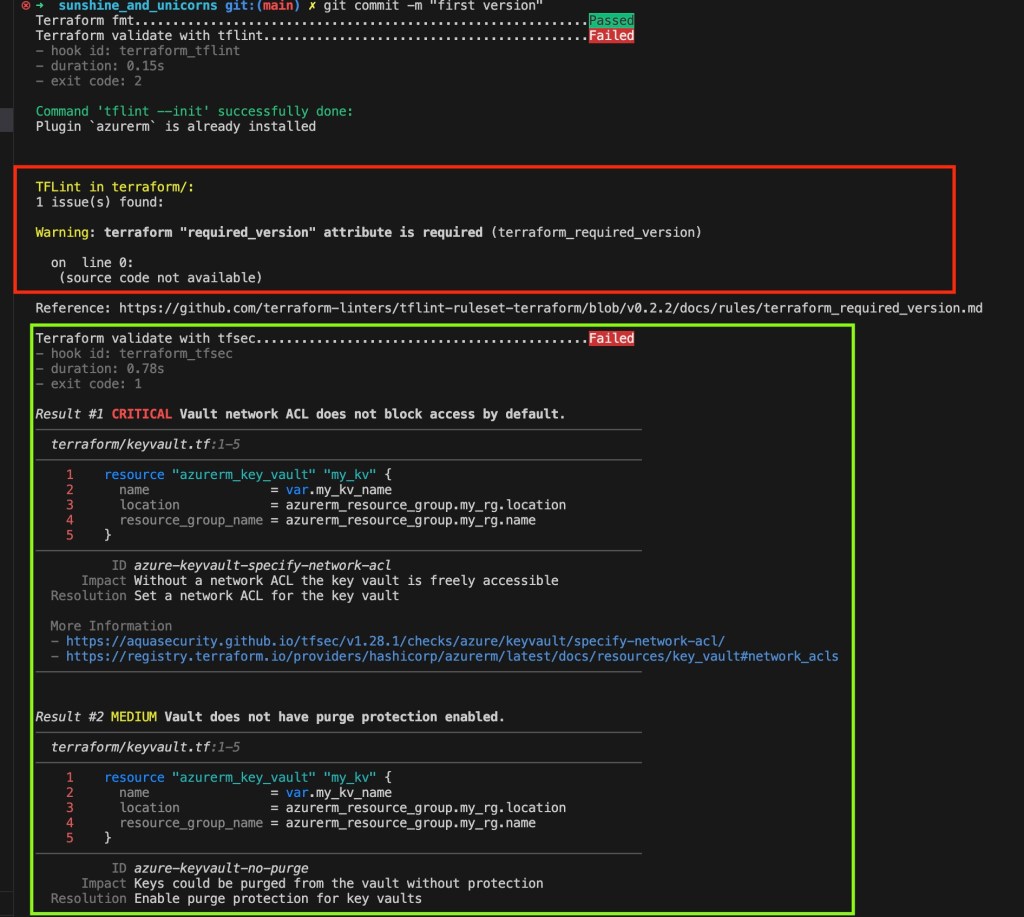
The hooks will run in the order we had defined them. TFLint is first here, and it is a pretty basic error which can be fixed by adding the required_version attribute to the terraform block

Running again, we can see that tflint no longer gives an error
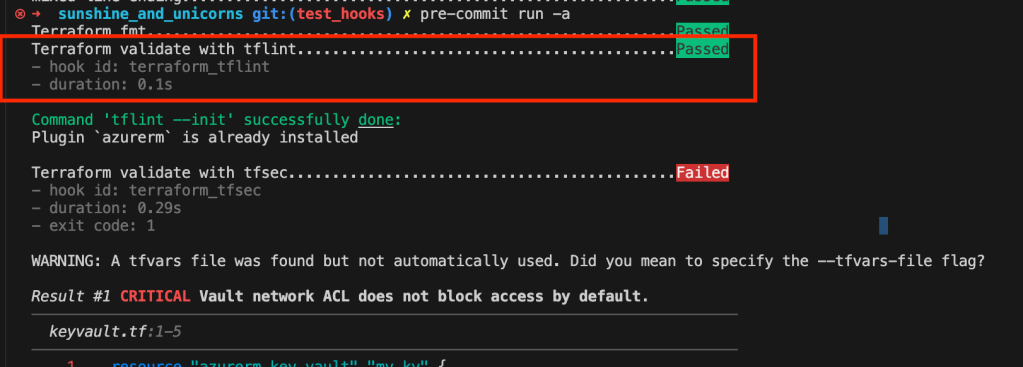
Nice! lets try to fix the warnings flagged by TFsec.

Something i find very nice with both TFsec and tflint is the fact that outputs almost always include references and guidance for how to resolve these warnings or errors. This makes it easy understand what the issue is and how to fix it.
For the CRITICAL warning, lets add this code to resolve it, restricting network access for the key vault we have defined. This is a good security practice.

Running the hooks again, it is resolved, but one more warning remain.

Cool, but let us say that we actually dont want to resolve this medium issue, as we need to have purge protection disabled. How can we ignore this specific rule?
Its pretty simple, grab the ID of the rule, in this case azure-keyvault-no-purge as shown above, and add a comment following this syntax to the offending line:
#tfsec:ignore:<ID of rule>
In this case this is the resource line.
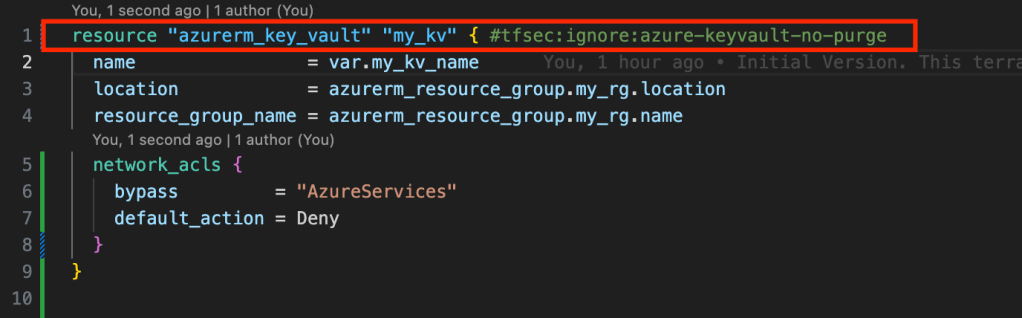
Now every check passes, except for terraform validate which runs almost at the end.

I had neglected to put quotations around the string! Running again, terraform validate flags some other errors, these are arguments that are required but not currently included.
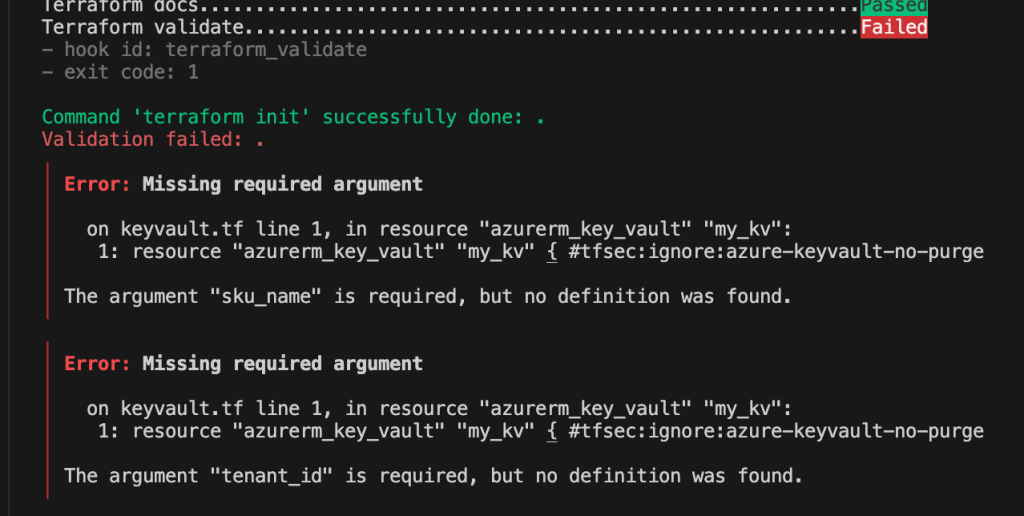
So lets just add these

Now, next time we run git commit, the commit is approved and we can push it to our upstream repository
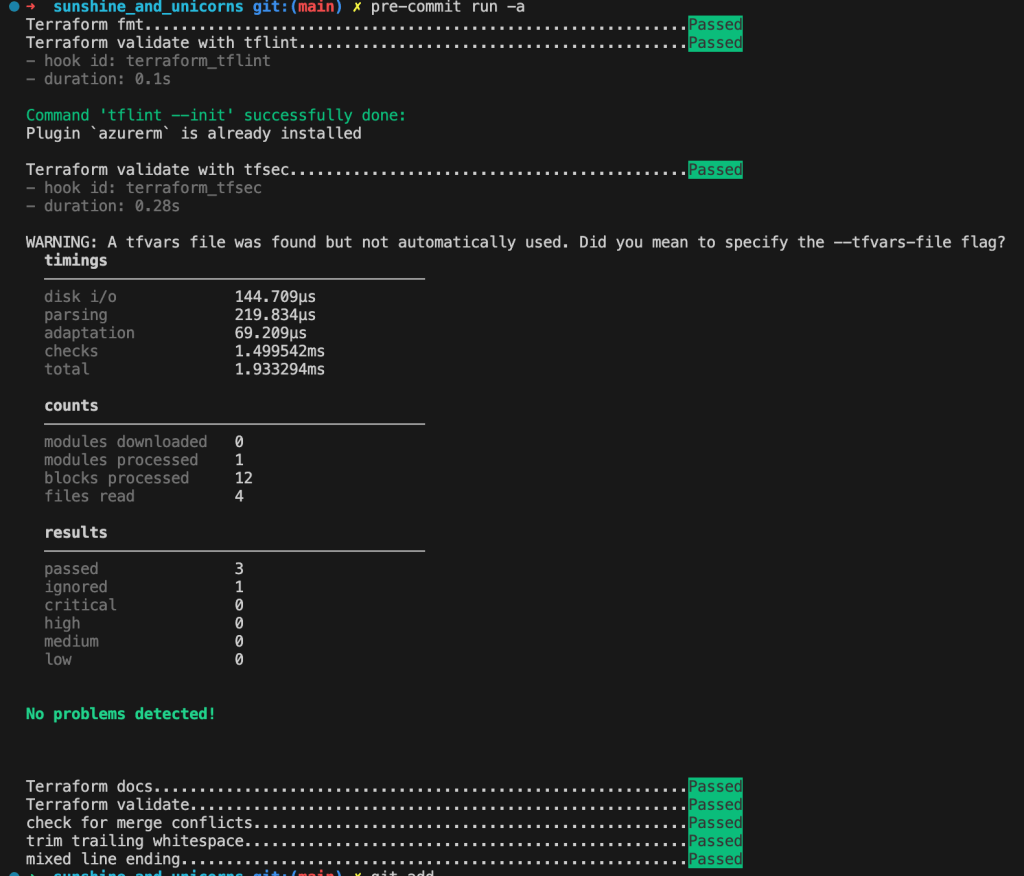
Give it a try yourself! The combination of hooks and arguments for these vary greatly based on your use case, but hopefully this gave an introduction for how to get started.
Whats next?
Now, if this got you hooked (get it?), feel free to read my other post about End-to-End testing terraform. This is a bit more involved however, and requires some knowledge of the GO programming language.
Thanks for reading!
 Emil Brasø
Leave a comment